To add a shared calendar to your Outlook profile, do the following:
1. Click the calendar icon in the lower right corner of Outlook.

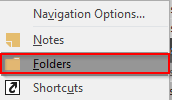
2. Click the three dots in a row in the same menu bar, choose Folders.

3. Find the Public Folders group in your calendar window pane and click the small arrow to the left of it to expand.

4. Find the calendar you are looking for, right-click on it and click Add to Favorites.
5. Give the calendar a name or leave it default and click Add.
6. You should now see the calendar added to your Outlook. It will be under Other Calendars. Ensure that you have a check in the box to the left of it to activate it.
0 Comments