Issue: The user gets a prompt that asks them to sign in when trying to save a file from Word or Excel directly into OneDrive when they are obviously already signed in.
Cause: This issue is caused by any of several scenarios:
- The user's Office 365 account password changed and for some reason did not sync properly with Office
- The user had the older version of OneDrive (OneDrive For Business) installed on their computer and the upgrade did not completely remove the old version
- The user has failed uploads in their upload center
- The OneDrive Cache needs to be cleared on.
Resolution: Follow these steps in order to correct the issue:
- Open an Office program (Word or Excel), go to File > Account > Sign Out
- Find the Microsoft Upload Center either in the system tray or in the Start Menu. Go to Settings and change these settings:
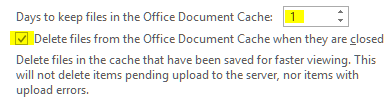
- Go to the Control Panel > Credential Manager > Windows Credentials and delete any credentials that say MicrosoftOffice16_Data: or MicrosoftOffice15_Data: and OneDrive For Business
- Download the program from Microsoft here and run it.
- Once it opens, click Next > Yes > Next > Yes and let the program finish.
- Open Excel or Word again, go to File > Account and have the user sign back in.
- Try to open and save a document to OneDrive, it should now work.
0 Comments